


Clear Stickers



- Perfect transparent sticker look
- Comes in rolled sticker format
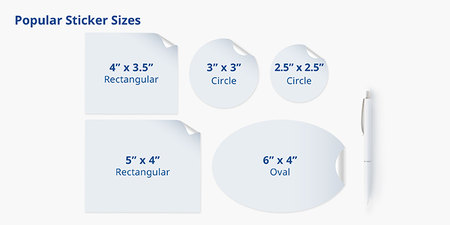
- Custom shapes and sizes
- Ships in 6 business days
Product Features


Show Off Your Products With Clear Stickers
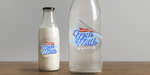
Print clear stickers and bring your branding to a whole new level. Clear sticker printing gives logos or artwork a no-background look, creating a “floating” effect that looks like the design is printed directly on the object. They work really well on smooth surfaces, and offer a clean, minimalist style that lets your design shine.
While clear stickers are lightweight, they’re strong and built to last. They're printed on a durable plastic film and come with a protective coating that keeps your artwork looking great even with frequent use. When designed effectively, clear stickers could just be what your brand needs to capture your target market.
Clear Stickers for Any Purpose
Clear stickers look their best when applied on transparent surfaces. You get to show off the contents of a container without obstructing your view. Their resistance to oils and most chemicals also makes them a top choice for many industries.
Popular uses of clear stickers include:
- Laptops and tablets – Add a logo or illustration for a personal touch to your devices.
- Water bottles and drinkware – A great way to personalize merch and everyday items.
- Windows and glass surfaces – Suitable for graphics that let light pass through.
- Notebooks and journals – Decorate covers without making them look cluttered.
- Sports gear and gadgets – Customize helmets, cases, or equipment with a subtle design.
- Freebies – Include freebies when customers come to your booth or when they purchase your product.
Design Tips for Clear Sticker
Since clear stickers have a transparent background, it’s important to design with contrast in mind. Here are some tips to consider:
- Design in colors that stand out against the background
- Lighter hues work best on dark surfaces, while dark colors will show up better on light backgrounds
- Save your file in CMYK color mode
- Use a minimum resolution of 300 dpi
PrintRunner’s sticker printing services let you get creative and customize your product to suit your need. You don’t need to worry about your logo looking washed out. Even if clear stickers are transparent, we start with a layer of white ink then print your design on top. This creates an opaque layer for color accuracy and vibrance.
If you have questions or need assistance, call us at 888-296-5760 from Monday through Friday, 5 a.m. to 7 p.m. PT.
Choose PrintRunner for Your Printing Needs
At PrintRunner, we ensure maximum customer satisfaction – from our top-notch customer service to the quality of print products that we offer. But in case you need more convincing, we have listed some of the things that you can expect from us.
High-quality printing. The bread and butter of our business is printing. That’s why we make sure that our customers are satisfied with their orders by selecting only the best materials for our products and using state-of-the-art equipment to produce our high-quality prints.
Quick turnaround times. The standard turnaround time for our print products is usually anywhere between 3 to 6 business days. If you are working on a tight schedule, you have the option to expedite the turnaround time to 1-2 business days.
Extensive product selection. Whether it’s for business, school, nonprofit work, or personal use, our extensive selection of print products can cater to practically every need. We offer custom business cards, stickers, labels, banners, posters, catalogs, brochures, and more.
Excellent customer service. We make customer support a priority at PrintRunner. If you need to reach us, there are multiple ways to do so. You can contact us via email at customercare@printrunner.com, phone at 1-888-296-5760, and through our Live Chat feature and contact form that can be found here.
Frequently asked questions, guides, and more. Want to learn more about our turnaround time, accepted file formats, and shipping options? Don't know what bleed, safe area, and CMYK means? You can find all these topics in our Help Center page. There are also FAQs, glossary of print terms, video tutorials, and more.
Free and downloadable design templates. You can get professionally designed templates for a wide range of products including brochures, stickers and labels, flyers, banners and signs, boxes, and more. Download them for free and edit them using professional editing software such Adobe Photoshop and Illustrator.
Easy-to-use online design tool. Create your own design in just a few minutes with the help of our intuitive online design tool. After selecting the specifications of your print product, there's an option below the product calculator to go straight to our online design tool. Use it to customize our free design templates or to create a design from scratch.
How to Apply Your Clear Stickers
Applying clear stickers on most surfaces is a breeze. If you want to do it perfectly in your first try, be sure to follow these three easy steps:
Clean the surface. Thoroughly remove any dust, dirt, and oil from the surface where you are going to apply your custom clear sticker. This helps ensure that the adhesive will stick on properly. You can use mild soap, warm water, and a clean, dry cloth to wipe off any particles from the surface before applying the sticker.
Use a label dispenser or apply your stickers by hand. If you are using a label dispenser to apply your clear sticker, you just need to make sure that the sticker is aligned with the item that you are labeling. If you are doing it manually or by hand, peel off the clear sticker and then apply it by pressing down on the edge without repositioning your fingers. This is to avoid leaving fingerprints underneath the clear sticker.
Smooth out your sticker. Once applied on the surface, the final step is to smooth out the clear sticker. By doing this, you can remove or push out any air bubbles underneath the sticker. This can also help guarantee that your clear sticker properly adheres to the surface and cannot be easily removed.
How to Order Clear Stickers
Ready to print clear stickers? Here’s how to get started:
- Choose your size, shape, quantity, and finish.
- Upload your design or create one using our online design tool.
- Request a free file check to ensure everything prints correctly.
- Proceed to checkout.
Clear Sticker FAQs
Yes. White ink can be added behind your design, so colors stay vibrant and visible
Clear stickers work best on smooth surfaces such as glass, plastic, metal, laptops, and bottles.
Yes, they are. Clear BOPP is water- and moisture-resistant, making it ideal for bottles and other items.
Since the sticker is transparent, it is possible that the surface color may show through. Using strong contrast or white ink helps avoid this.
Choose the option that best matches your final design. You can choose to make all white colors transparent, or just certain white sections, or only the background. Before printing, we also provide free file reviews to ensure your sticker designs appear exactly as you want them to.
Yes. Our die-cutting services let you upload any design and we can trim your sticker to that exact shape. Just click the Shape dropdown on the order calculator and select Custom.
We offer blank sticker templates to help you get started on your design. You can find these on our Templates tab. Just choose the sticker size you want to design and download your preferred file type. Be sure to save your design in the proper PDF or PNG format. In the order calculator, indicate your printing specifications for the white ink in your design.
As soon as you upload your design, you can request a free file review. This service is offered for free at no extra charge. Our pre-press team can inspect your files and email you a PDF proof for your approval. If we find problems with your design, a representative will contact you to work on a resolution.
This indicates how long it takes for us to get your order printed and ready for shipping. Printing turnaround times are only from Mondays to Fridays and don’t include weekends, holidays, and delivery transit.